Manual Ecoride Ambassador
Here you’ll find instructions and assistance for those who want to use the Ecoride electric bicycle.
In case of a serious accident, always call SOS ALARM at 112.
When possible, then call OurGreenCar Customer Service: +46101660555 — we will assist you.
Minor Accidents and Damages
Under “My Bookings”, click on “Report Damage.”
Take photos if any damage has occurred and upload them. In the text box, describe what happened and include the vehicle’s name.
Click here to access the Ecoride instruction manual.
Safety
Handle the bike and its accessories carefully to ensure safety and extend its lifespan.
Always check the bike before departure to reduce the risk of injury to yourself or others in traffic.
Check tire pressure and make sure no parts are loose or damaged.
Bring the chain to securely lock the bike.
Specifications
-
Gears: 3–7
-
Front motor
-
Range: approx. 40–85 km
Before Departure
-
Make sure you have read and understood the terms of use and instructions.
-
Unlock the bike using the app by pressing “Unlock and Start.”
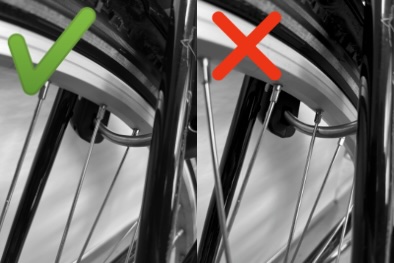
Ensure that no spoke obstructs the metal bar. -
Carefully disconnect the charging cable.
-
Bring the chain with you so you can securely lock the bike during your ride.
-
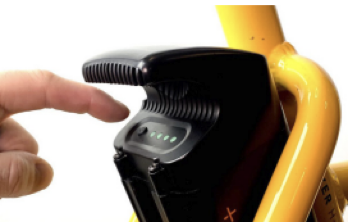
Start the bike by pressing the ON button on top of the battery (see image).
If nothing happens, check that the battery is switched on and showing a green light.
Control Panel
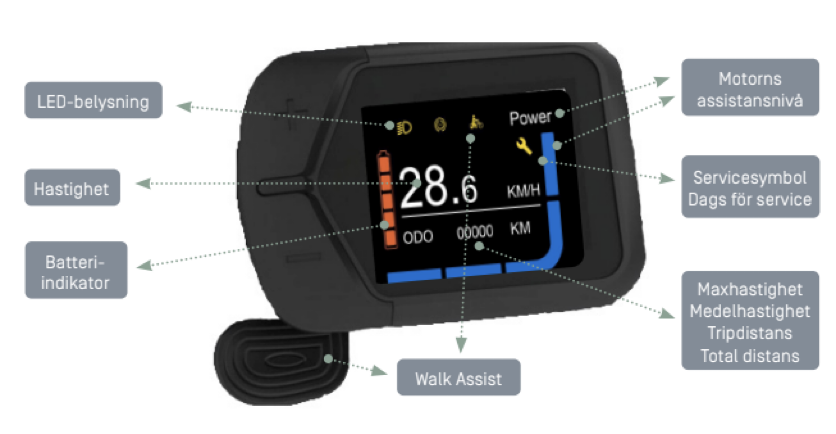
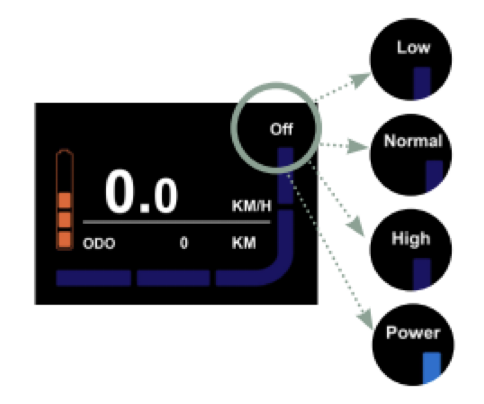
The Ecoride is equipped with an LCD display featuring a variety of functions.
(See the image below for an overview of the different symbols and their meanings.)
Description of Symbols/Functions:
ON/OFF
To start the control panel, press the button on the battery, as described above.
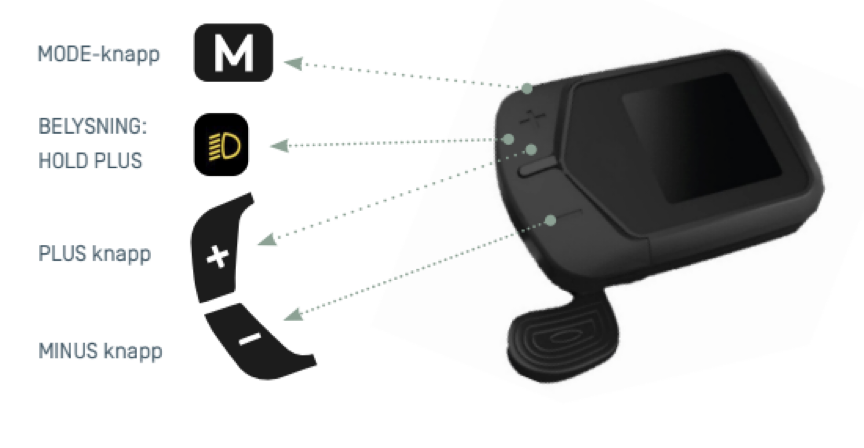
MODE Button
When you press “M”, you can switch between the following information displayed on the screen:
-
ODO (Odometer): Total distance ridden
-
TP DIST (Trip Distance): Distance ridden since the last reset
-
AVG SPD: Average speed
-
MAX SPD: Maximum speed
MOTOR ASSIST LEVELS
When you activate the system on your Ecoride, the bike starts in LOW mode.
Change the assist level by pressing the PLUS (+) or MINUS (–) button.
You can choose between five assist modes:
-
OFF: No motor assist, but the lights can still be used.
-
LOW: Low assist up to 25 km/h
-
NORMAL: Medium assist up to 25 km/h
-
HIGH: High assist up to 25 km/h
-
POWER: Maximum assist up to 25 km/h
(Speed may vary by up to ±5%.)
WALK ASSIST
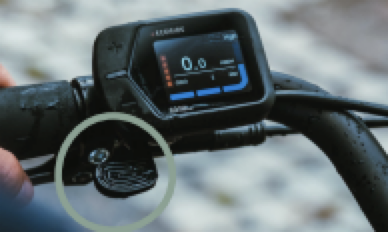
Walk Assist can be used to help propel the bike forward while you are walking beside it.
It is activated either by using the thumb throttle or by holding down the Minus (–) button.
Note: The display/system must be switched on for this function to be available.
LIGHTING ON/OFF
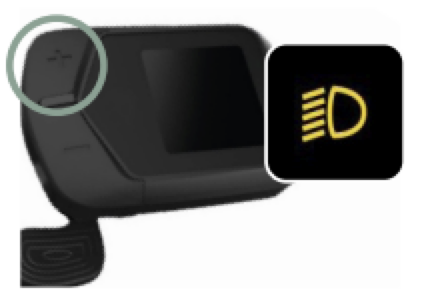
Press and hold the PLUS (+) button for 3 seconds to turn the lights on or off.
BATTERY INDICATOR
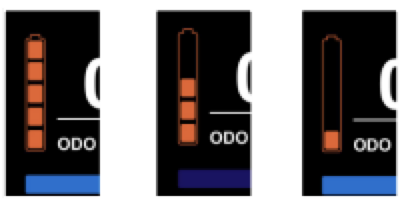
When the battery is fully charged, all five bars in the battery symbol are displayed.
As you use the battery, the bars gradually disappear as the voltage decreases.
When the battery reaches its lowest voltage, the outline of the battery symbol starts blinking.
During the Ride
-
Handle the bike carefully and stay focused on traffic.
-
Park the bike considerately! Lock it using both the chain and the frame lock, and secure it to a fixed object with the chain.
-
Change the lock mode in the app by pressing “Lock/Unlock” — do not press End Booking. Make sure no spoke obstructs the metal bar.
-
When riding in the dark, press the + button for 3 seconds to turn on the lights.
End of Booking
-
Park the bike in the designated spot within the vehicle pool.
-
Thread the chain through the ground loop and the bike wheel, then attach the end to the frame lock.
-
Connect the bike to the charger.
-
Carefully check that no spoke is blocking the metal bar on the frame lock.
-
End the booking in the app and make sure the bike is locked before leaving.
-
Take any trash with you.
OurGreenCar Customer Service
Phone number: +46101660555
You can always call us during working hours if you have questions or concerns about your booking, the vehicle, or general inquiries.
Emergency service is available 24/7 for urgent matters.
#tags:
bike, instructions, accident, gears, mid-drive motor, lights, motor, range, lock bike, unlock bike, start booking, end booking, charger, charging, chain, battery, ecoride