In Case of an Accident
If you are involved in a serious traffic accident or collide with wildlife, you must always call SOS ALARM at 112.
When possible, then call our customer service for assistance: OurGreenCar Customer Service: +46101660555.
Click here to access the Tesla instruction manual.
Specifications
-
Range:
-
Standard Range Plus: up to 350 km
-
Long Range: up to 585 km
(Note: The car’s range varies significantly depending on outdoor temperature and driving style.)
-
-
Charging Connectors:
-
For charging at the vehicle’s home location and public stations, use the Type 2 connector, the charging cable belonging to the car at its base station.
-
For charging at public fast-charging stations, use the CCS connector — the cable is available at the station.
-
You can also charge at Tesla’s own fast-charging stations (Tesla Superchargers).
-
-
Isofix Mounts: Yes
-
Transmission: Automatic
How Do I Release the Charging Cable?
Press the lightning bolt icon on the car’s touchscreen.
Navigate to Controls > Charging > Open Charge Port on the touchscreen.
Note: The charge port closes automatically. Do not touch it after removing the cable.
Then place the cable in the trunk.
How Do I Start the Car?
Press the brake pedal, then select a drive mode using the right-hand stalk on the steering column.
If the car requires a Tesla key card to start:
Use the app to lock and then unlock the car again.
Drive Modes
The right stalk has four modes: P – N – R – D
Always press the brake pedal when switching between modes.
-
P – Park
-
N – Neutral
-
R – Reverse
-
D – Drive
Press the button at the end of the stalk to put the car in Park.
Gently move the stalk in either direction to select Neutral.
See instructional video:
https://bit.ly/38QZnGw
How Do I Turn Off the Car?
Make sure the Tesla is in Park — the car will automatically power down when you exit and lock it.
How Do I Lock and Unlock the Car?
Make sure all doors are closed.
Open the OurGreenCar app and tap the lock icon (note: do not end your booking).
Press “Unlock” to unlock the car.
How Do I Start the Windshield Wipers?
Use the stalk to the left of the steering wheel.
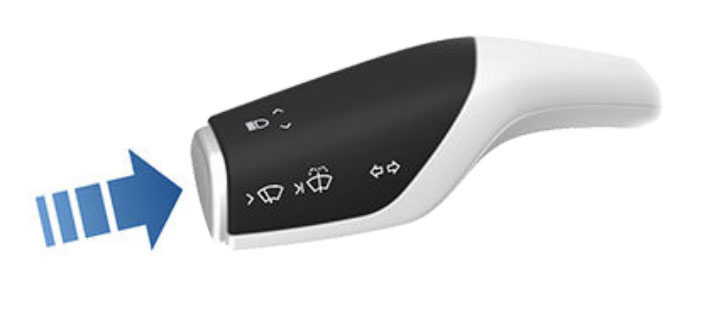
For a single wipe of the windshield wipers, press the button shown in the image above once.
After pressing the button, a small menu will appear on the car’s screen, where you can adjust the wiper speed.
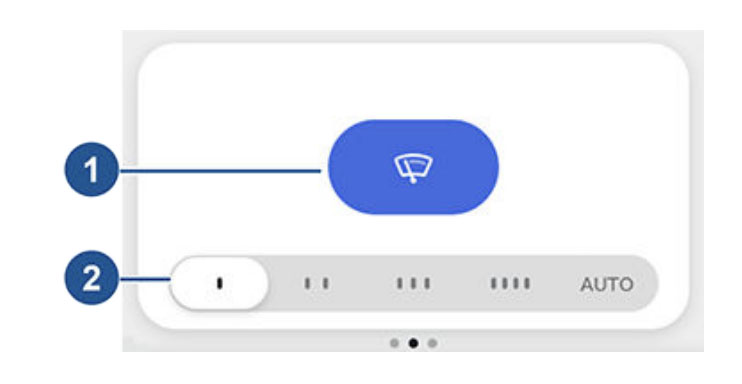
Intermittent, slow
Intermittent, fast
Continuous, slow
Continuous, fast
AUTO (Detects water on the windshield and adjusts the wiper speed accordingly)
Washer Fluid
Press and hold the button below to activate the washer nozzles.
Charging and Supercharging
You can charge your booked car freely at its home station throughout your booking.
If you need to charge the car while on your trip, you can use the car’s navigation system to locate nearby public charging stations.
To do this, open the map on the car’s touchscreen and enter your destination — the car will automatically display available charging stations along your route.
You are responsible for any charging costs outside your home station.
In addition to the car’s navigation system, there are many useful apps and websites that show available charging stations, such as A Better Route Planner and Charge Finder (none of these are affiliated with OurGreenCar).
The connectors used to charge the Tesla Model 3 are CCS and Type 2.
Tesla also provides its own fast-charging network — Tesla Superchargers.
You can charge at any of these stations for a fee.
Visit Tesla’s Supercharging page for more information, or simply enter your destination in the car’s GPS system — if charging is needed, the GPS will guide you to the nearest Supercharger.
OurGreenCar Customer Service
Phone number: +46101660555
You can call us during working hours if you have any questions or concerns about your booking, the vehicle, or general inquiries.
Emergency service is available 24/7 for urgent matters.
#tags:
electric car, car, accident, report damage, manual, collision, towing, damage, range, charging connector, charger, charging station, charging, isofix, child seat, gearbox, tow bar, release charging cable, start car, drive mode, turn off car, booking, lock, unlock, charging, customer service, number, car key, instructions, usage, accident, transport, towing, damage report, report damage, damage claim, stone chip, scratches, vehicle, kilometers, refuel, tank, refueling, charging post, charging station, home charging, away charging, charge car, remove charging cable, disconnect charger, unlock charger, find charging station, gear, gear lever, trailer, driving, start car, get started, unlock car, unlock door, shut down, start, warning, alerts, flat tire, messages, dashboard, support, support number, help, charge port, windshield wipers, lockout, breakdown, supercharging, washer fluid