📊 General information (Specifications):
- Vehicle type: Electric Car
- Range: Up to 250 km (Range varies depending on outside temperature and driving style)
- Isofix: Yes
- Towbar: No, but exceptions may occur (If a specific vehicle has a towbar, it will be clearly marked with the text "Towbar" right next to the license plate number in the app).
- Gearbox: Automatic
- Charging connections: Type 2 (Standard charging) & CHAdeMO (Fast charging)
- Nissan Leaf Owner's Manual
| 🔑 1. Pick up & Start the car |
|
Follow these steps in order to get rolling.
-
Unlock: Open the OurGreenCar app. When your booking time starts, a green button reading "Start reservation" will appear – click it to unlock the car.
-
Disconnect the charging cable: Press the button with the charging station symbol located to the left of the steering wheel to release the cable lock.
-
Unplug the cable from the car first, then from the charging station.
-
Store the cable in the trunk. Always bring the charging cable with you when you leave!
-
Key for temporary stops: In the glove compartment, you will find a physical car key attached to a tag holder. Use this if you need to park and lock the car temporarily during your trip.
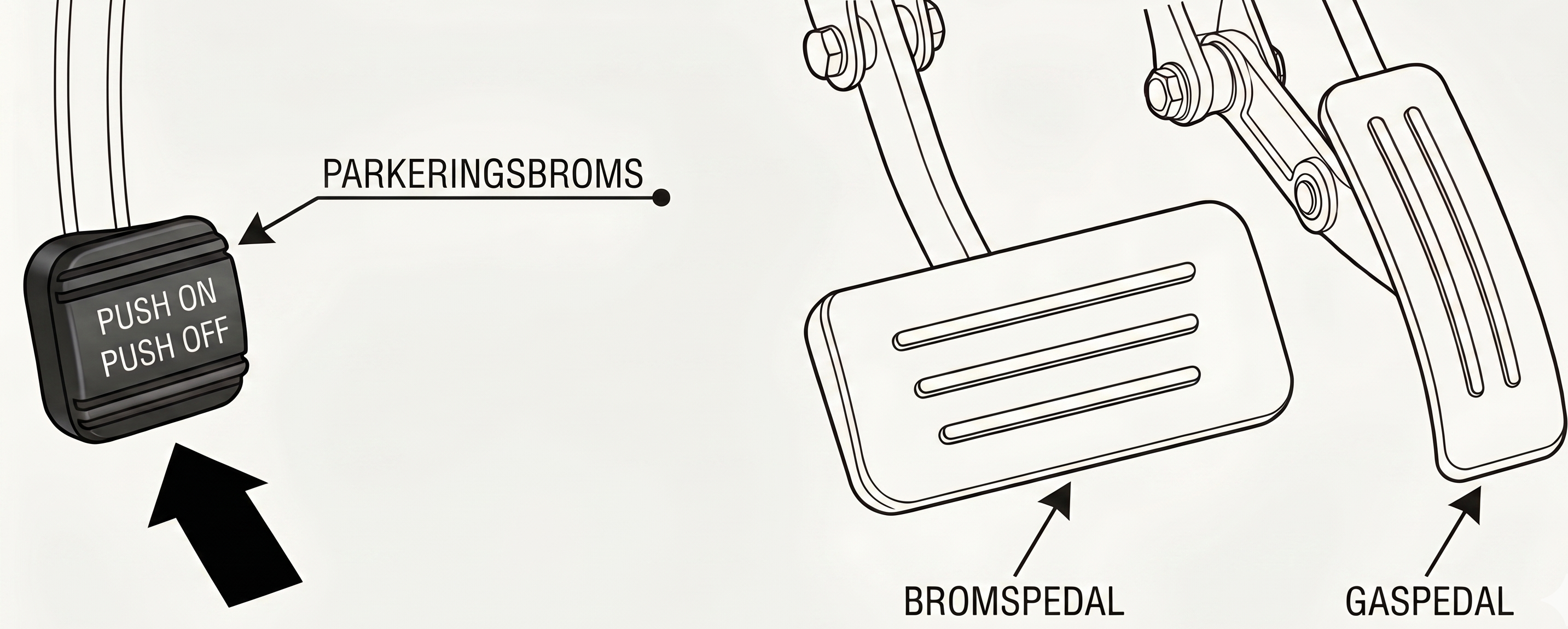
- Release the parking brake: This car has an extra pedal located by your left foot. Press down firmly on this pedal to release the parking brake before driving.
-
Start the car:
Press the brake pedal down firmly and press the START button to the right of the steering wheel.
Do not forget to release the parking brake located down by your left foot.
|
| 🕹️ 2. Driving & Gear Selection |
|
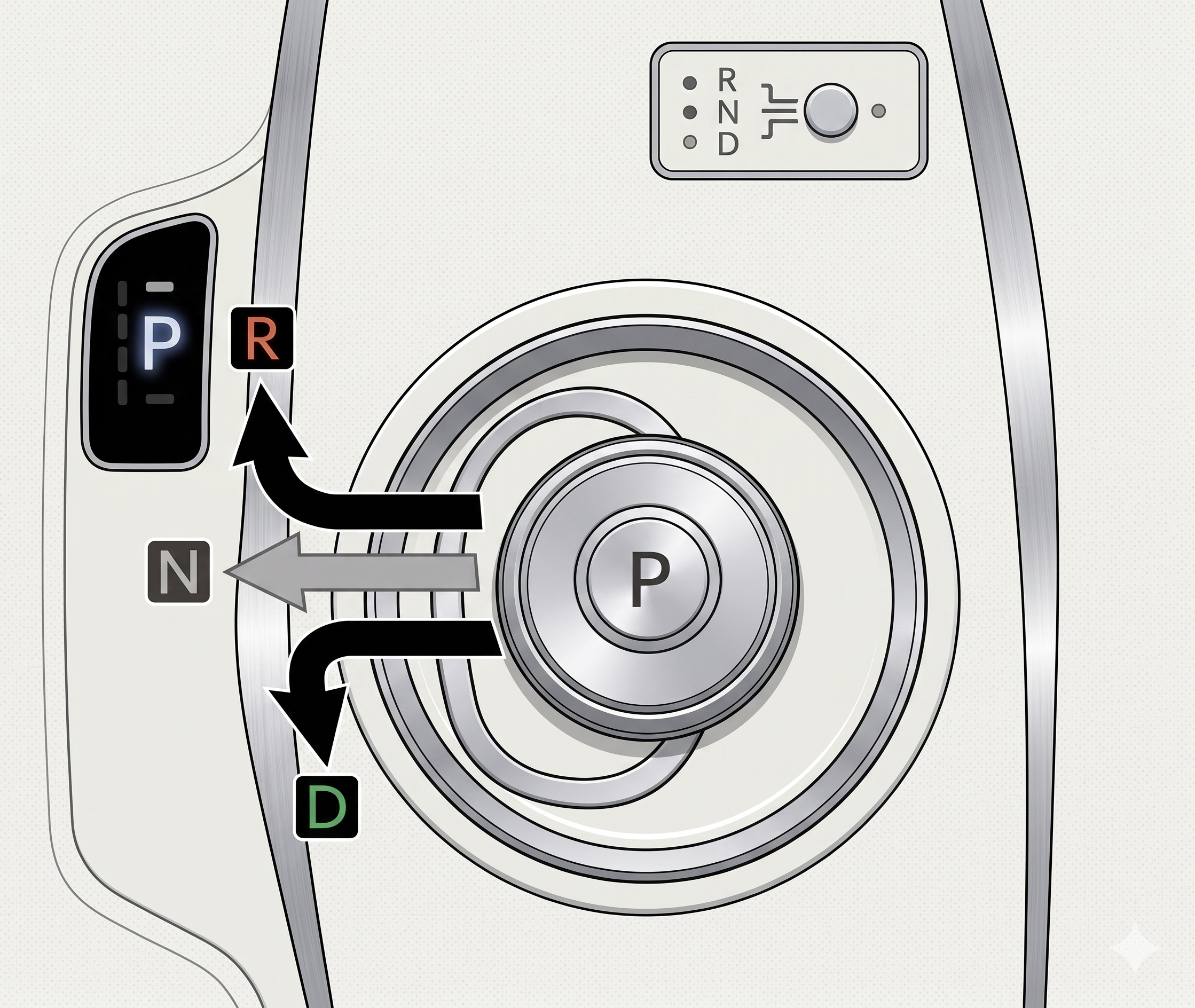
Always press the brake pedal down when changing gears.
-
D (Drive): Push the selector lever to the left and backward to drive forward.
-
R (Reverse): Push the selector lever to the left and forward to reverse.
-
N (Neutral): Hold the selector lever to the left for a second for neutral.
-
P (Park): Press the P button on top of the gear selector to put the car into park mode.
|
| 🔌 3. Charging during your trip |
|
⚡ Charging at the car's home station is always free.
⚡ You pay for the cost of charging outside the car's home station yourself.
If you need to charge during trip:
Find charging stations:
-
- Use the car's built-in navigation system. Enter your destination on the navigation system map, and the car will automatically display available charging stations along your route.
- Additionally, there are many useful apps and websites available, such as A Better Route Planner and Charge Finder (none of these platforms are associated with OurGreenCar).
Choose the correct connector:
-
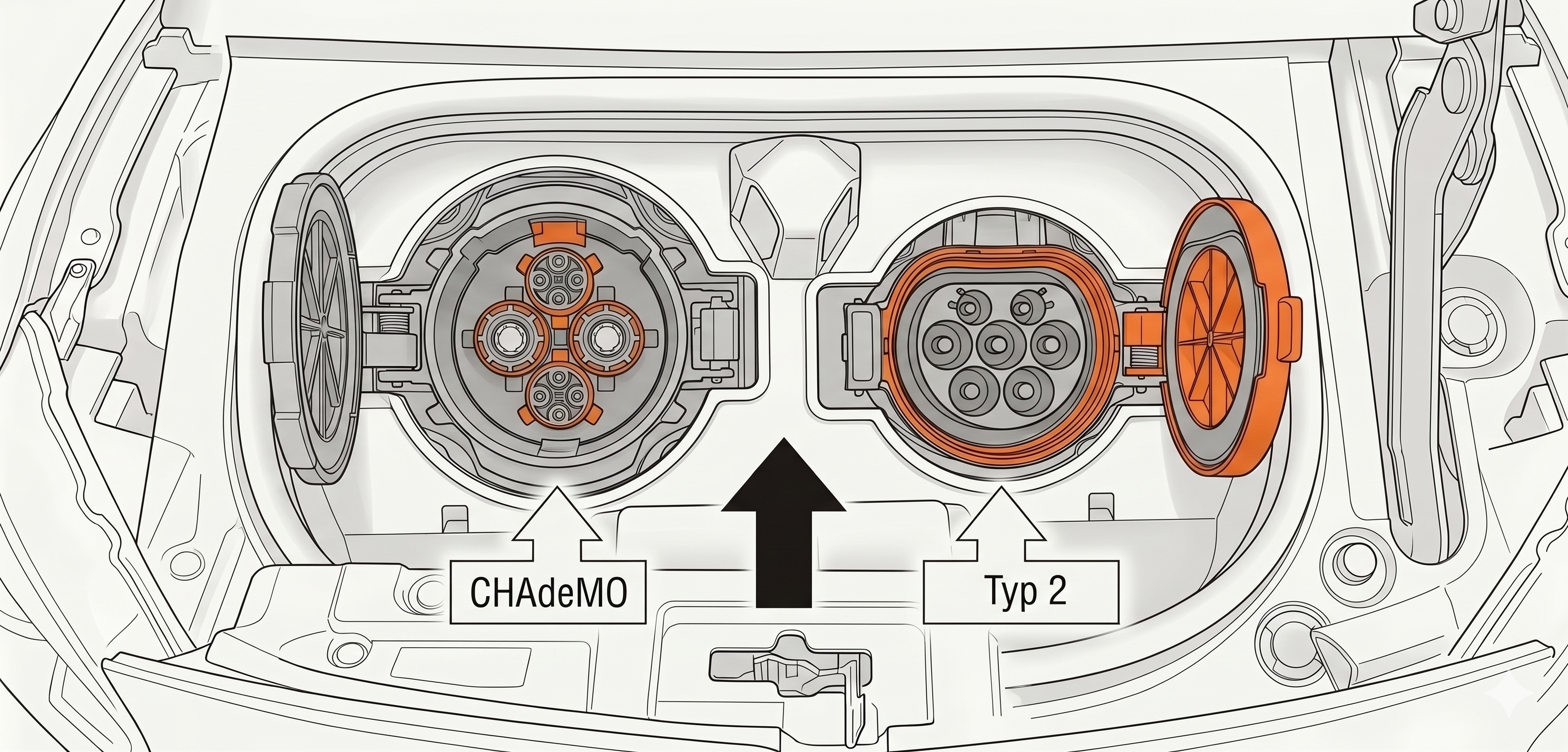
- Type 2 (Standard charging): Use the cable in the trunk or the cable attached to the public charging station. Fits into the right-hand charging socket on the car (orange cap).
-
CHAdeMO (Fast charging): Use the cable attached to the public charging station. Fits into the left-hand charging socket on the car (black cap).
-
If you want to know more about charging times and battery capacity for our vehicles, you can find more information here: How to charge you electric car
|
| 🏁 4. Parking & Ending Your Booking |
|
Thank you for the ride! Please do this before leaving the car:
-
Return:
Park the car in its dedicated OurGreenCar spot. The vehicle may only be returned to the address specified for the vehicle in the app (the same address where it was picked up).
- Turn off ignition:
Press the P button on the gear selector.
Press down the parking brake with your left foot.
Press the START/STOP button to the right of the steering wheel to turn off the ignition.
-
Car key:
Put the car key back into the tag holder inside the glove compartment.
-
Plug in the charger:
Open the charging hatch using the button to the left of the steering wheel.
Take the charging cable out of the trunk and plug it into the charging station first, and then into the car.
Verify that the car begins to charge. (Note: Some charging stations require activation via an RFID tag or card; information about this will be visible in the app under the current vehicle).
-
Lock:
Check that all windows and doors are closed.
Lock the car by clicking "End reservation" in the app. Double-check that the car doors lock properly.🔒
|
🚨In Case of an Emergency (Damage or Accident)🚨
-
Serious accident or wildlife collision:
Always call SOS ALARM at 112 immediately.
When you are able to, call our customer service for assistance, OurGreenCar Customer Service: +46 10 166 05 55.
-
Minor accidents/damage to the car:
Report the damage via the app – go to "My bookings" > click into your current reservation and click "Report damage". Describe what happened and upload photos.
📞 OurGreenCar Customer Service & Support: +46 10 166 05 55
❗ We provide 24/7 support for urgent issues.
❗For general questions or inquiries regarding bookings/vehicles, you can always call us during our regular business hours.
#tags:
electric car, car, accident, report damage, manual, collision, towing, damage, range, charging connector, charger, charging station, charging, isofix, child seat, gearbox, tow bar, release charging cable, start car, drive mode, turn off car, booking, lock, unlock, charging, error messages, parking brake, Nissan assistance, customer service, number, car key, instructions, usage, accident, transport, towing, damage report, report damage, damage claim, stone chip, scratches, vehicle, kilometers, refuel, tank, refueling, charging pole, charging station, home charging, away charging, charge car, remove charging cable, disconnect charger, unlock charger, find charging station, gear, gear lever, trailer, driving, start car, get started, unlock car, unlock door, start car, warning, alerts, messages, dashboard, support, support number, help