Manual - Renault Megane E-Tech 🚗

Here you will find instructions and assistance for booking and using the Renault Megane

📊 General information (Specifications):

  • Vehicle type: Electric Car
  • Range: Up to 300 km (Range varies depending on outside temperature and driving style)
  • Isofix: Yes
  • Towbar: No, but exceptions may occur (If a specific vehicle has a towbar, it will be clearly marked with the text "Towbar" right next to the license plate number in the app).
  • Gearbox: Automatic
  • Charging connections: Type 2 (Standard charging) & CCS (Fast charging)
  • Renault Megane Ownersmanual
🔑 1. Pick up & Start the car 

Follow these steps in order to get rolling.

  1. Unlock: Open the OurGreenCar app. When your booking time starts, a green button reading "Start reservation" will appear – click it to unlock the car.

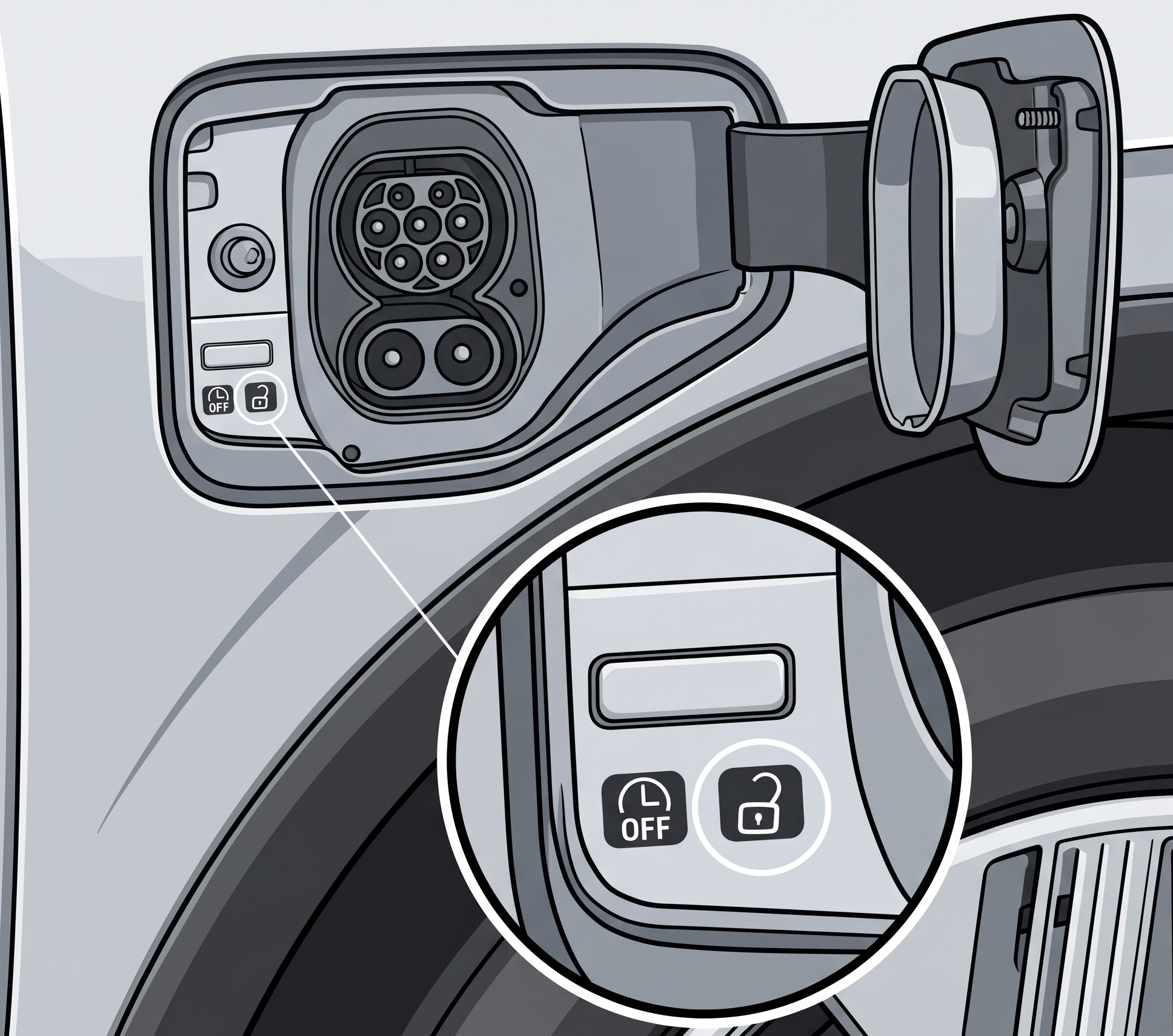
  2. Disconnect the charging cable: Press the lock icon button located inside the charging flap to unlock the cable. (Note: The car must be unlocked in order to release the cable).

    • Unplug the cable from the car first, then from the charging station.

    • Store the cable in the trunk. Always bring the charging cable with you when you leave!

  3. Key for temporary stops: In the glove compartment, you will find a physical car key attached to a tag holder. Use this if you need to park and lock the car temporarily during your trip. 

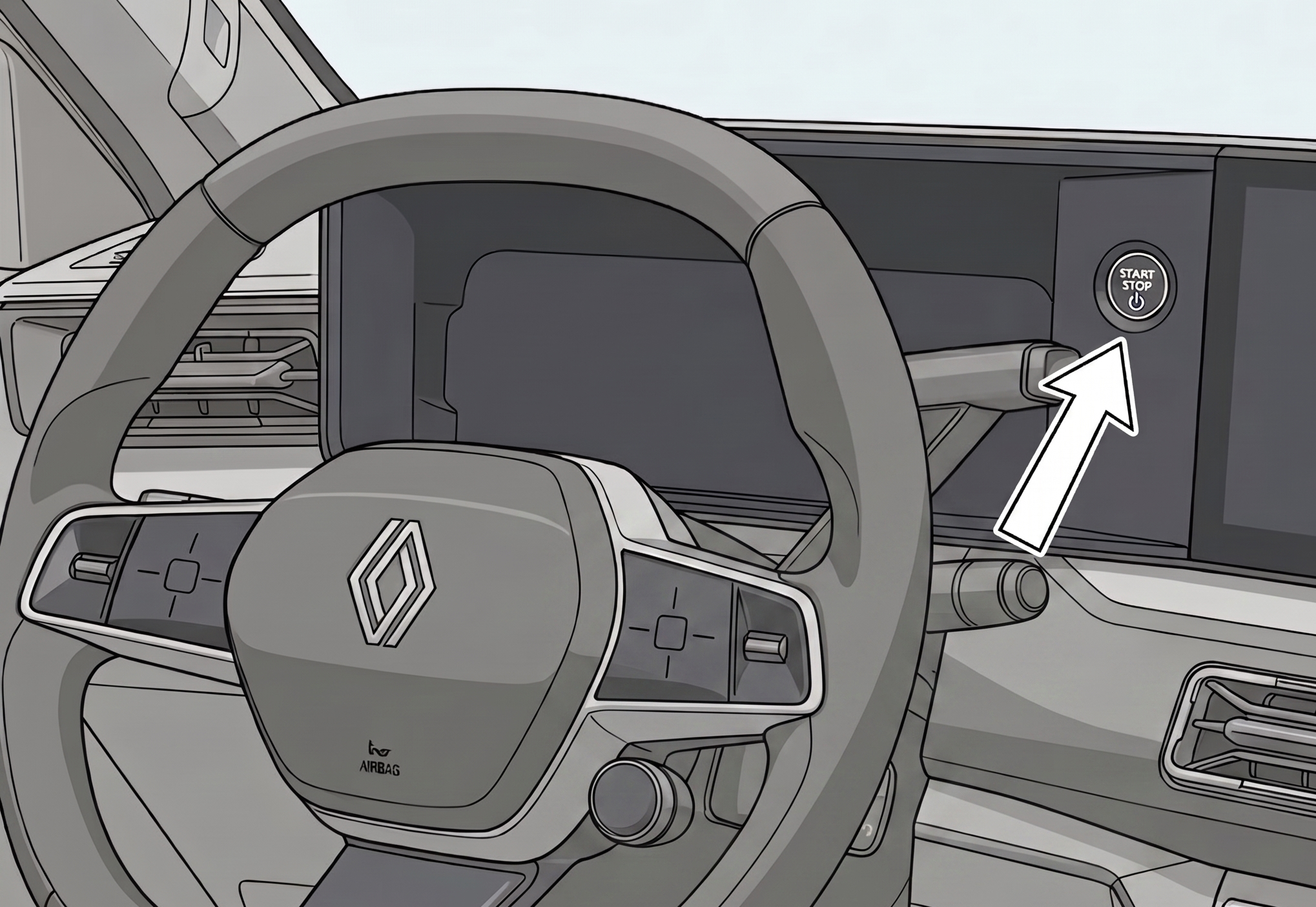
  4. Start the car: Press the foot brake firmly and press the start button to the right of the steering wheel.


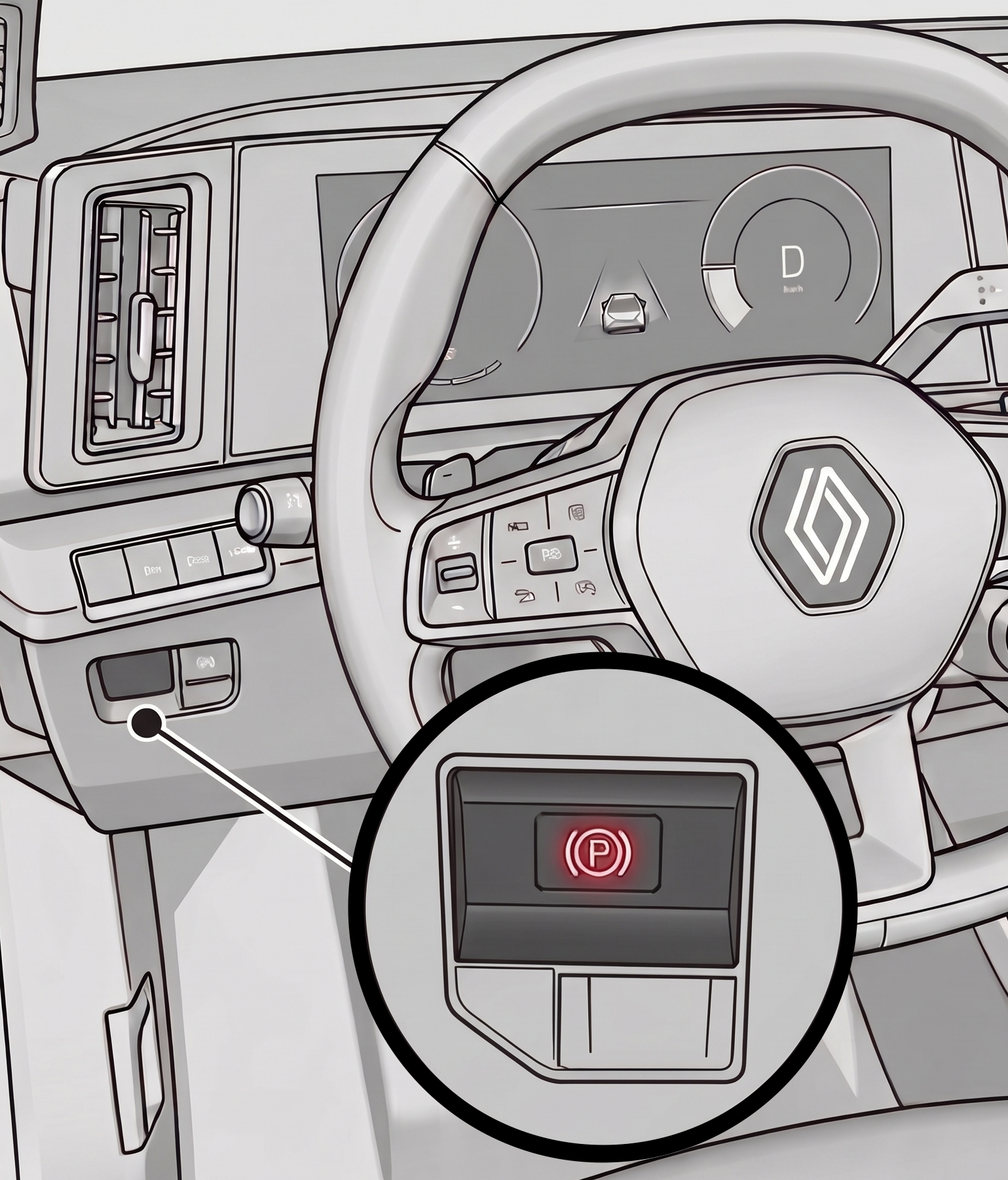
  5. Release the parking brake: Release the parking brake using the button located to the left of the steering wheel.
     

đŸ•č 2. Driving & Gear Selection

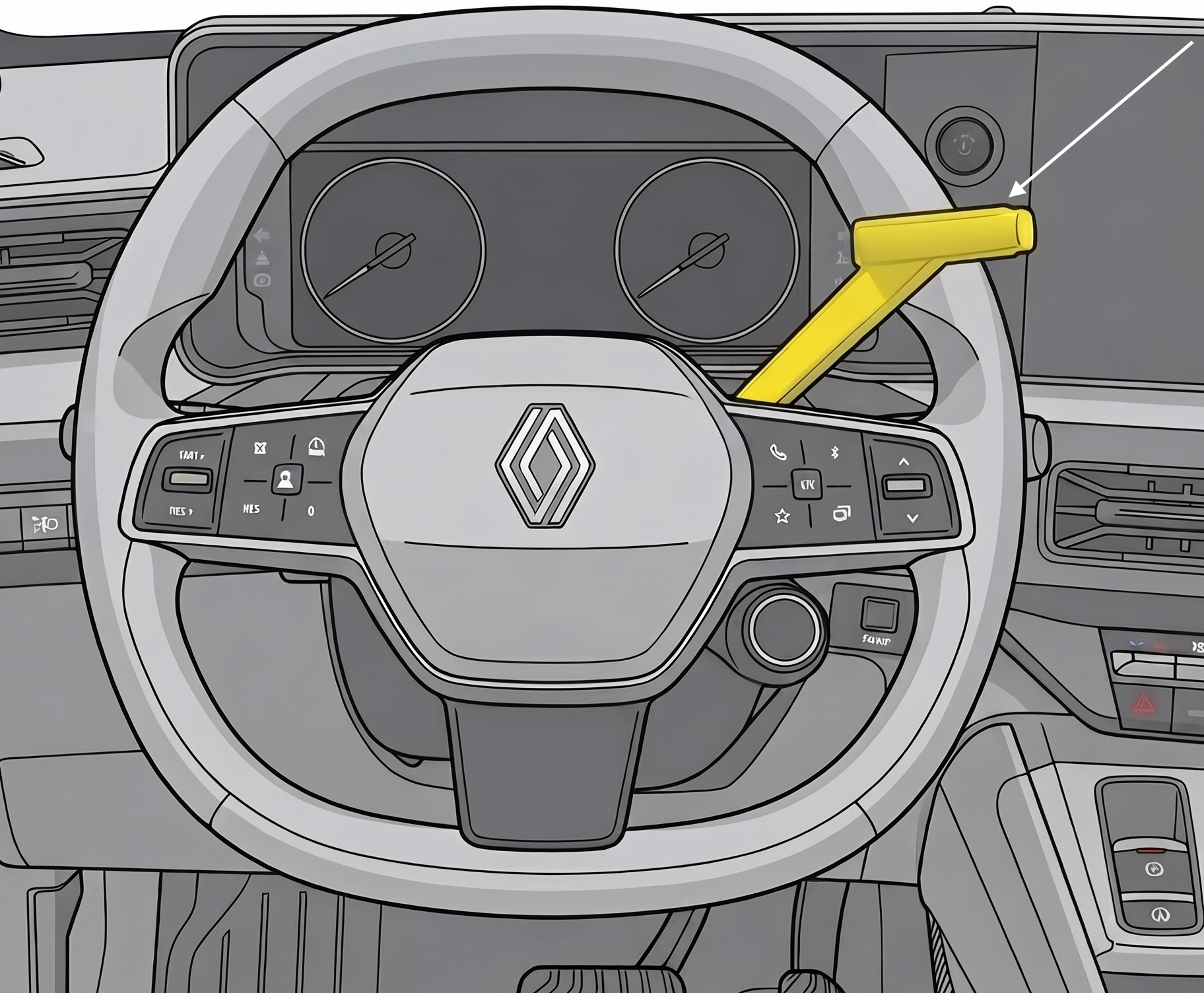
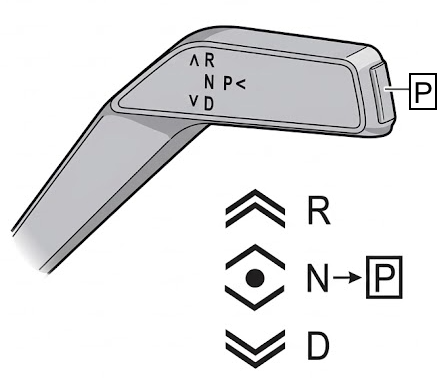
Always press the brake pedal when shifting gears. The lever behind the steering wheel has four positions: R – N – D – P

  • R - Revere 
  • N - Neutral
  • D - Drive
  • P - Park
    Press the button at the very end of the lever to put the car into park.
🔌 3. Charging during your trip

⚡ Charging at the car's home station is always free.
⚡ You pay for the cost of charging outside the car's home station yourself.

      
If you need to charge during trip: 

Find charging stations: 

    • Use the car's built-in navigation system. Enter your destination on the navigation system map, and the car will automatically display available charging stations along your route.  

    • Additionally, there are many useful apps and websites available, such as A Better Route Planner and Charge Finder (none of these platforms are associated with OurGreenCar).

Choose the correct connector:

    • Type 2 (Standard charging): Use the cable in the trunk or the cable attached to the public charging station.
    • CS (Snabbladdning): Använd kabeln som sitter fast på den publika laddstationen. 

    • If you want to know more about charging times and battery capacity for our vehicles, you can find more information under: How to charge you electric car

🏁 4. Parking & Ending Your Booking

Thank you for the ride! Please do this before leaving the car:

  1. Return: 
    Park the car in its dedicated OurGreenCar spot. The vehicle may only be returned to the address specified for the vehicle in the app (the same address where it was picked up).

  2. Turn off ignition:
    Press the P button on the gear selector.
    Press down the parking brake with your left foot.
    Press the START/STOP button to the right of the steering wheel to turn off the ignition.

  3. Car key:
    Put the car key back into the tag holder inside the glove compartment.
  4. Plug in the charger: 
    Open the charging flap by pressing on it. Take the charging cable out of the boot and plug it into the charging station and the car. Make sure the car starts charging. (Some charging stations require activation using a charging fob or charging card; if so, this information will be visible in the app under the specific vehicle).

  5. Lock: 
    Check that all windows and doors are closed.
    Lock the car by clicking "End reservation" in the app. Double-check that the car doors lock properly.🔒


🚹In Case of an Emergency (Damage or Accident)🚹

  • Serious accident or wildlife collision:
    Always call SOS ALARM at 112 immediately.
    When you are able to, call our customer service for assistance, OurGreenCar Customer Service: +46 10 166 05 55.

  • Minor accidents/damage to the car:
    Report the damage via the app – go to "My bookings" > click into your current reservation and click "Report damage". Describe what happened and upload photos.

📞 OurGreenCar Customer Service & Support: +46 10 166 05 55

❗ We provide 24/7 support for urgent issues.
❗For general questions or inquiries regarding bookings/vehicles, you can always call us during our regular business hours.


# tags:
electric car, EV, car, accident, report damage, manual, crash, towing, damages, range, charging connector, charger, charging station, charging, isofix, car seat, child seat, gearbox, towbar, disconnect charging cable, start car, driving mode, turn off car, booking, locking, lock, charging, error messages, carry out overhaul, check tyre pressure sensor, adjust tyre pressure, renault assistance, ourgreencar customer service, number, car key, instructions, usage, accident, transportation, towing, damage report, report damage, damage reporting, stone chip, scratches, vehicle, kilometers, refuel, tank, refueling, charging point, charging station, charge at home, charge away, charge car, remove charging cable, unplug charger, unlock charger, find charging station, gear, gear lever, trailer, drive, start vehicle, get started, unlock car, unlock door, start car, warning, warnings, tyre pressure, tyres, puncture, message, dashboard, support, support number, help